ConnectS Developer Guide
Acknowledgements
This project is based on the AddressBook-Level3 project created by the SE-EDU initiative.
Use of AI
Yueh-Ching:
- https://chatgpt.com/share/67f43a76-f80c-8003-b896-645c72f57732
- https://chatgpt.com/share/67f43a9b-a410-8003-a601-a7e521df7ba1
- https://chatgpt.com/share/67f43aaf-f900-8003-8604-2f3ef08127a3
- https://chatgpt.com/share/68146976-0bb0-8003-92a6-26121fbaec7b
Setting up, getting started
Refer to the guide Setting up and getting started.
Design
Architecture
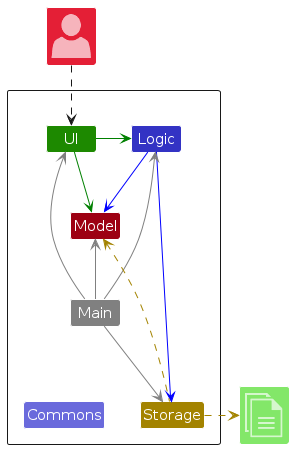
The Architecture Diagram given above explains the high-level design of the App.
Given below is a quick overview of main components and how they interact with each other.
Main components of the architecture
Main (consisting of classes Main and MainApp) is in charge of the app launch and shut down.
- At app launch, it initializes the other components in the correct sequence, and connects them up with each other.
- At shut down, it shuts down the other components and invokes cleanup methods where necessary.
The bulk of the app's work is done by the following four components:
UI: The UI of the App.Logic: The command executor.Model: Holds the data of the App in memory.Storage: Reads data from, and writes data to, the hard disk.
Commons represents a collection of classes used by multiple other components.
How the architecture components interact with each other
The Sequence Diagram below shows how the components interact with each other for the scenario where the user issues the command delete 1.
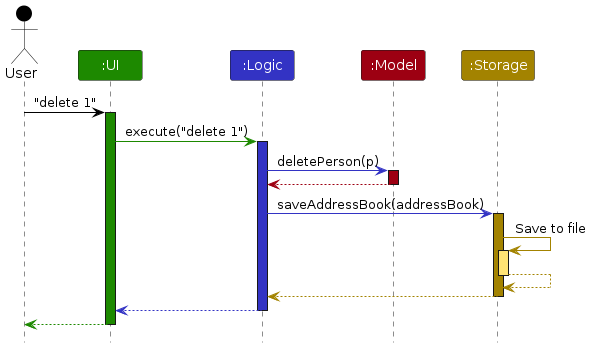
Each of the four main components (also shown in the diagram above),
- defines its API in an
interfacewith the same name as the Component. - implements its functionality using a concrete
{Component Name}Managerclass (which follows the corresponding APIinterfacementioned in the previous point.
For example, the Logic component defines its API in the Logic.java interface and implements its functionality using the LogicManager.java class which follows the Logic interface. Other components interact with a given component through its interface rather than the concrete class (reason: to prevent outside component's being coupled to the implementation of a component), as illustrated in the (partial) class diagram below.
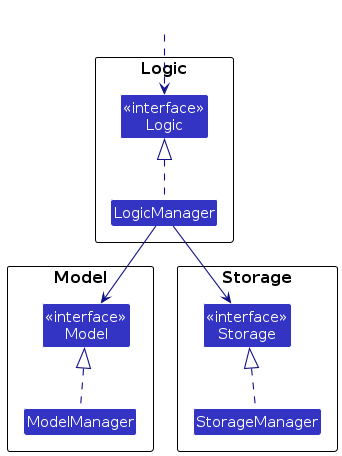
The sections below give more details of each component.
UI component
The API of this component is specified in Ui.java
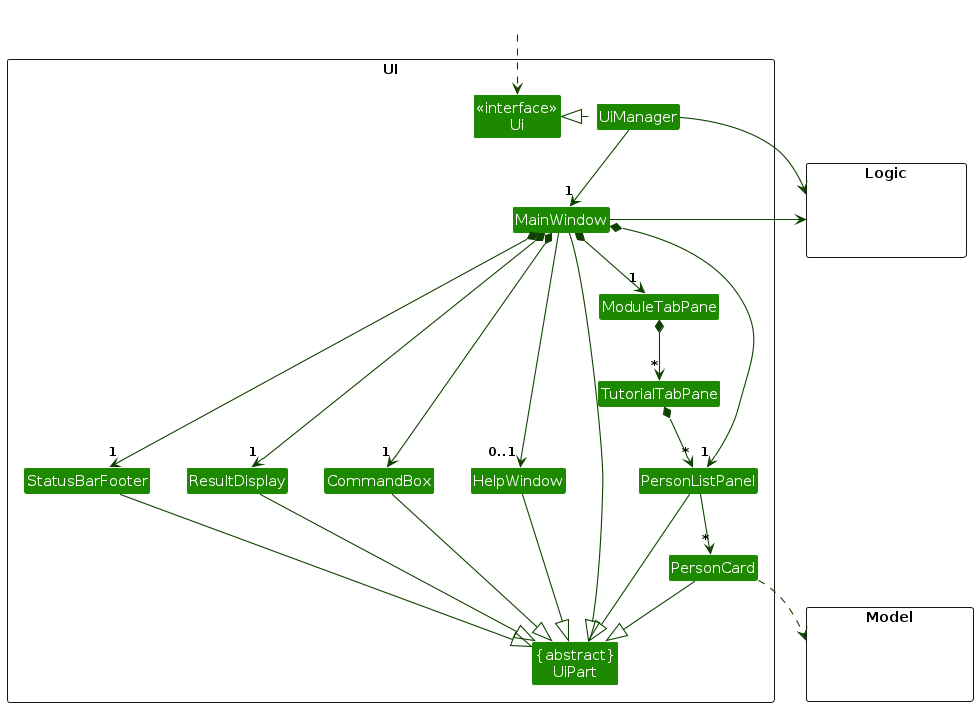
The UI consists of a MainWindow that is made up of parts e.g.CommandBox, ResultDisplay, PersonListPanel, StatusBarFooter etc. All these, including the MainWindow, inherit from the abstract UiPart class which captures the commonalities between classes that represent parts of the visible GUI.
The UI component uses the JavaFx UI framework. The layout of these UI parts are defined in matching .fxml files that are in the src/main/resources/view folder. For example, the layout of the MainWindow is specified in MainWindow.fxml
The UI component,
- executes user commands using the
Logiccomponent. - listens for changes to
Modeldata so that the UI can be updated with the modified data. - keeps a reference to the
Logiccomponent, because theUIrelies on theLogicto execute commands. - depends on some classes in the
Modelcomponent, as it displaysPersonobject residing in theModel.
Logic component
API : Logic.java
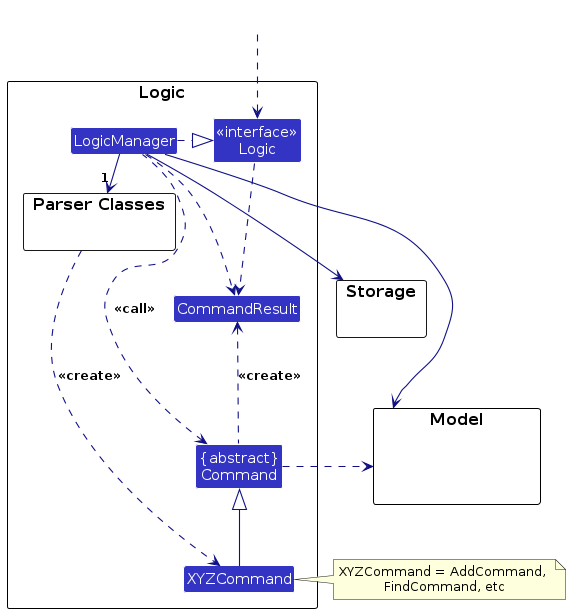
Here's a (partial) class diagram of the Logic component:
The sequence diagram below illustrates the interactions within the Logic component, taking execute("delete 1") API call as an example.
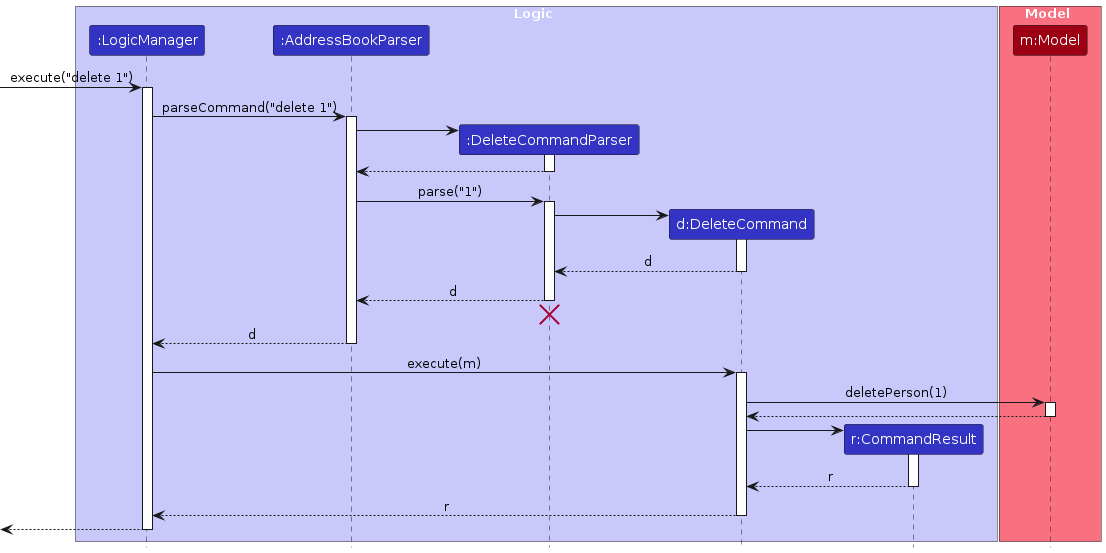
Note: The lifeline for DeleteCommandParser should end at the destroy marker (X) but due to a limitation of PlantUML, the lifeline continues till the end of diagram.
How the Logic component works:
- When
Logicis called upon to execute a command, it is passed to anAddressBookParserobject which in turn creates a parser that matches the command (e.g.,DeleteCommandParser) and uses it to parse the command. - This results in a
Commandobject (more precisely, an object of one of its subclasses e.g.,DeleteCommand) which is executed by theLogicManager. - The command can communicate with the
Modelwhen it is executed (e.g. to delete a person).
Note that although this is shown as a single step in the diagram above (for simplicity), in the code it can take several interactions (between the command object and theModel) to achieve. - The result of the command execution is encapsulated as a
CommandResultobject which is returned back fromLogic.
Here are the other classes in Logic (omitted from the class diagram above) that are used for parsing a user command:
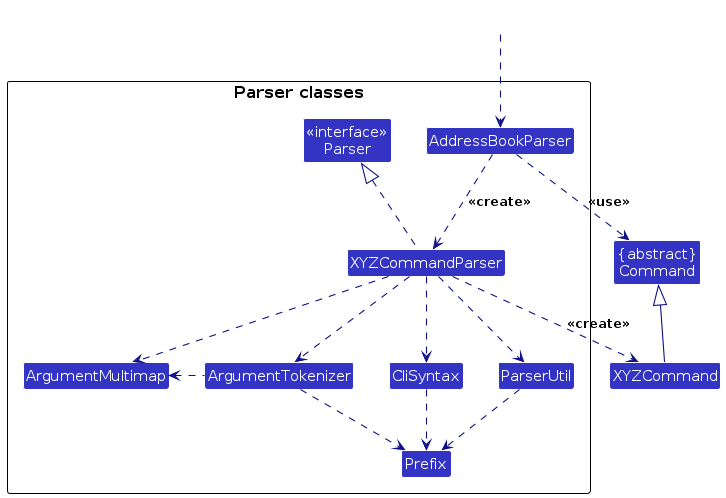
How the parsing works:
- When called upon to parse a user command, the
AddressBookParserclass creates anXYZCommandParser(XYZis a placeholder for the specific command name e.g.,AddCommandParser) which uses the other classes shown above to parse the user command and create aXYZCommandobject (e.g.,AddCommand) which theAddressBookParserreturns back as aCommandobject. - All
XYZCommandParserclasses (e.g.,AddCommandParser,DeleteCommandParser, ...) inherit from theParserinterface so that they can be treated similarly where possible e.g, during testing.
Model component
API : Model.java
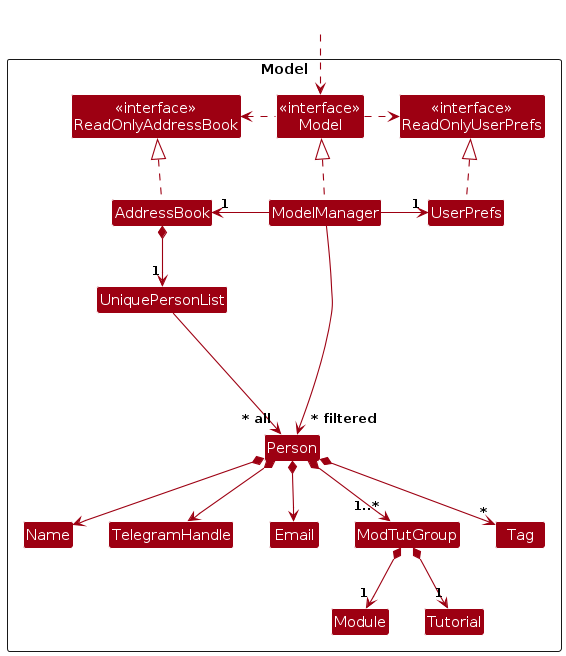
The Model component,
- stores the address book data i.e., all
Personobjects (which are contained in aUniquePersonListobject). - stores the currently 'selected'
Personobjects (e.g., results of a search query) as a separate filtered list which is exposed to outsiders as an unmodifiableObservableList<Person>that can be 'observed' e.g. the UI can be bound to this list so that the UI automatically updates when the data in the list change. - stores a
UserPrefobject that represents the user’s preferences. This is exposed to the outside as aReadOnlyUserPrefobjects. - does not depend on any of the other three components (as the
Modelrepresents data entities of the domain, they should make sense on their own without depending on other components)
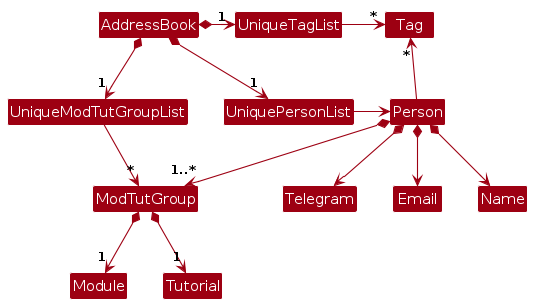
Note: An alternative (arguably, a more OOP) model is given below. It has a Tag and ModTutGroup list in the AddressBook, which Person references. This allows AddressBook to only require one Tag object per unique tag as well as only one ModTutGroup per unique ModTutGroup object, instead of each Person needing their own Tag or ModTutGroup objects.
Storage component
API : Storage.java
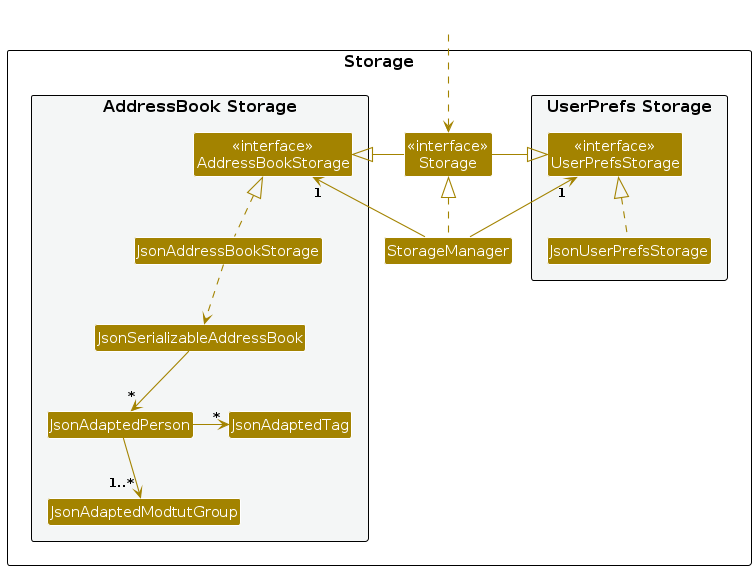
The Storage component,
- can save both address book data and user preference data in JSON format, and read them back into corresponding objects.
- inherits from both
AddressBookStorageandUserPrefStorage, which means it can be treated as either one (if only the functionality of only one is needed). - depends on some classes in the
Modelcomponent (because theStoragecomponent's job is to save/retrieve objects that belong to theModel)
Common classes
Classes used by multiple components are in the seedu.address.commons package.
Implementation
This section describes some noteworthy details on how certain features are implemented.
Change View Mode
The "View All" button changes the view mode to "View All", if it is not already in "View All"
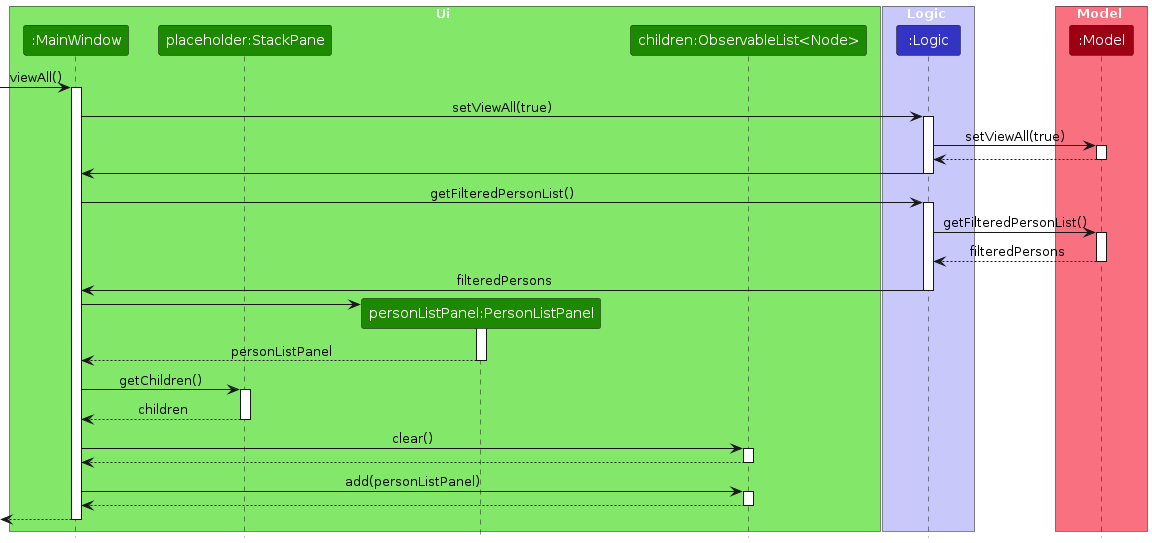
The "View Tabs" button works similarly, changing the view mode to "View Tabs", if it is not already in "View Tabs"
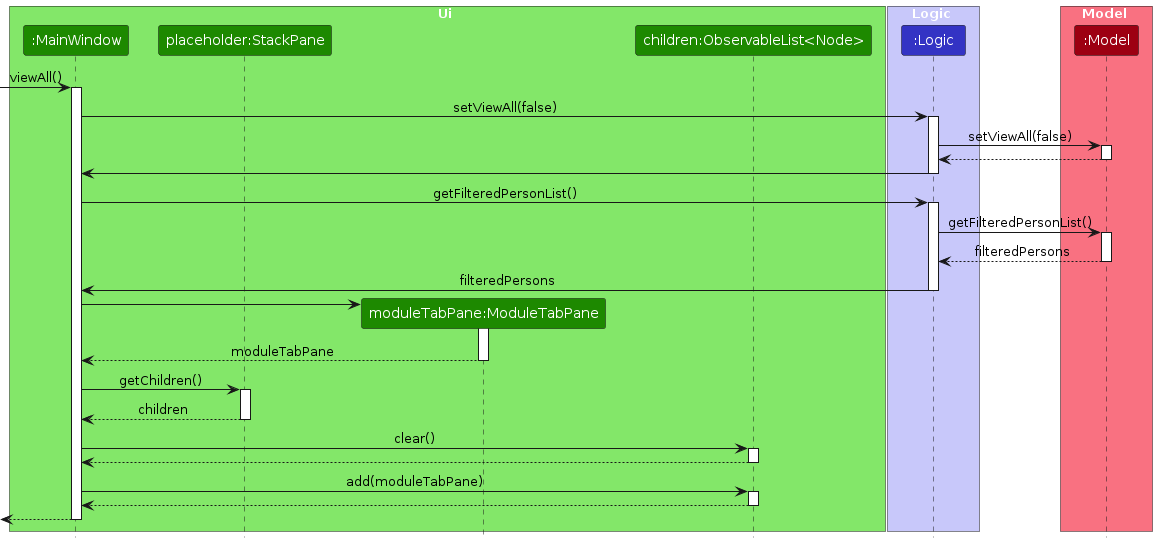
In order to maintain a similar architecture to the original AB3, new methods such as setViewAll() have been implemented.
Find Command
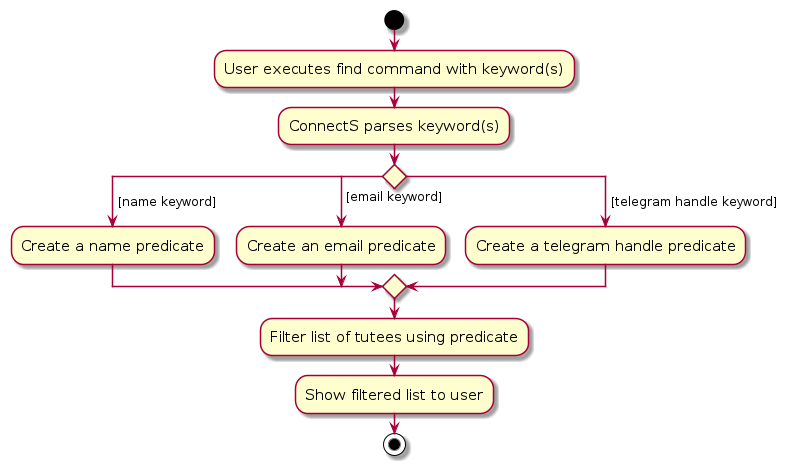
The find command only allows for one field of information to be used as a query keyword at a time. The FindCommandParser
parses the keyword and creates an appropriate subclass of the abstract class FieldContainsKeywordPredicate. This predicate subclass
is then passed on to the ModelManager class which uses it to filter the list which the user then sees.
Delete module feature
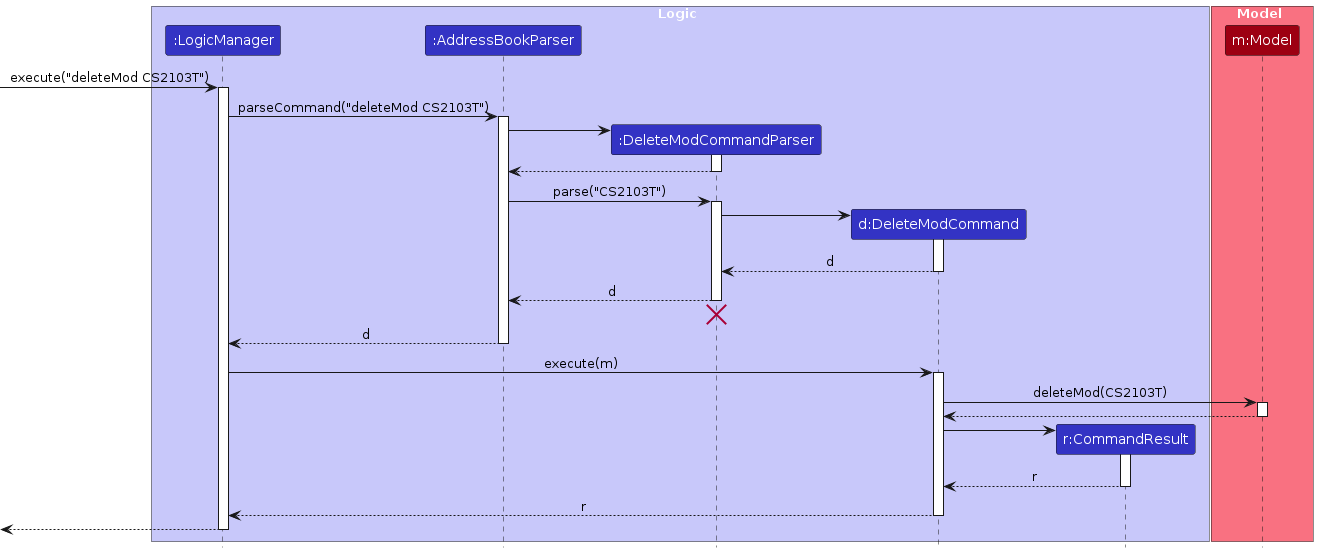
The delete module feature allows the user to delete the specified module from every tutee's module-tutorial module-tutorial list. In addition, if after the deletion, a tutee does not belong to any module-tutorial group, that tutee will be automatically deleted.
The behaviour of the deleteMod feature can be seen below.
Sort tutees feature
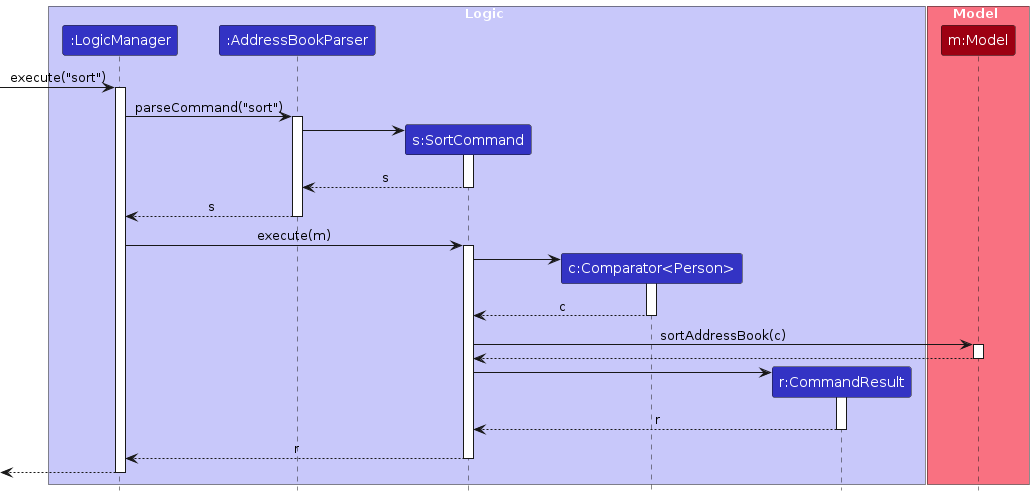
The sort tutees feature allows the user to sort the entire list of tutees by their names in lexicographical order.
The behaviour of the sort feature can be seen below.
Pin a Tutee feature
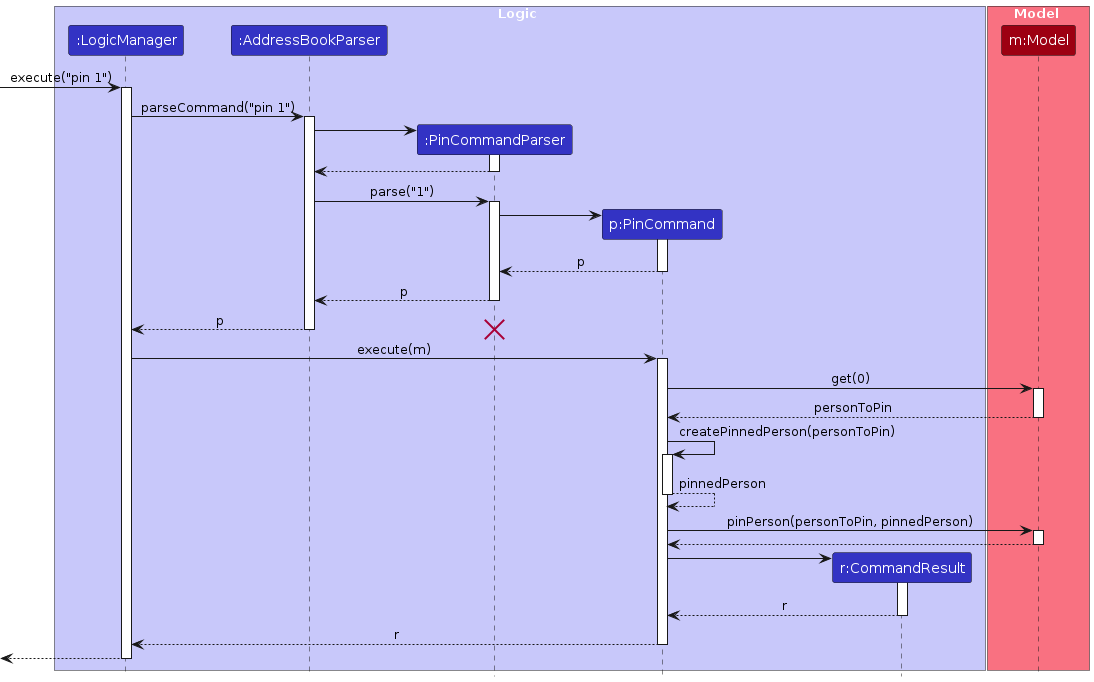
The pinning feature allows the user to pin a tutee to the top of the list.
The behaviour of the pinning feature can be seen below.
Documentation, logging, testing, configuration, dev-ops
Appendix: Requirements
Product scope
Target user profile:
Computing Student TAs who...
- teach multiple modules
- have multiple tutorial groups
- have multiple groups within a tutorial group
- have to manage reviewing their tutees’ projects/code
- keep track of relevant professors
Value proposition: Allows computing students to quickly sort contacts and grab information. Optimised for typing instead of mouse. Simplify managing social life. Allows TAs to group their tutees by course and tutorial group.
User stories
Priorities: High (must have) - * * *, Medium (nice to have) - * *, Low (unlikely to have) - *
| Priority | As a … | I want to … | So that… |
|---|---|---|---|
* * * | new user | easily find instructions on commands that I need to use | I can quickly lookup the commands I want |
* * * | impatient user | see my contacts with all its details | I can have a clear picture of all my contacts |
* * * | forgetful user | add a contact to a list with a name | I can store information related to the contact |
* * * | forgetful user | add telegram handles to a contact | I can look it up when I forget, since telegram is popular amongst university students |
* * * | forgetful user | add email to a contact | I can look it up when I forget |
* * * | forgetful user | add tutorial groups to a contact | I can see which group a student belongs to when I forget |
* * * | forgetful user | add modules to a contact | I can see which module a student belongs to when I forget |
* * * | clumsy user | delete a contact | I can remove contacts I accidentally added/don't need |
* * * | user that prefers typing | perform all commands by typing instead of using a mouse to click | I can execute commands faster because i type faster than i use a mouse to click |
* * | busy user | find contacts quickly with some of his incomplete information key in to the search bar | I do not waste time on the nitty-gritty |
* * | frequent user | pin important contacts on the top | I can easily find them |
* * | impatient user | see my contacts by name | I can read more contacts simultaneously |
* * | new user | have a guided tour of the basic commands | I can start using the app without needing to look up the commands |
* * | TA of multiple courses | easily group contacts based on tutorial group | I can find my students' contacts easily |
* * | TA of multiple courses | easily group contacts based on module | I can find my students' contacts easily |
* * | user that values efficiency | edit an existing contact's information | I can save time not needing to delete and make a new contact |
* * | user that values efficiency | easily find the commands I need by typing in a command to list all commands | I don't have to navigate to an external guide |
* * | TA that values efficiency | easily delete multiple contacts at once by giving a common module/tutorial | I don't waste time deleting contacts one by one |
* * | user who likes to keep things ordered | sort my contacts by alphabetical order (or any specific order) | everything is clear at a glance |
* * | user who's switching phone | be able to load all my contacts easily | I don't have to add them in again |
* * | user with many contacts | find contacts by email | I know who emailed me or forgot who the email belongs to |
* * | user with many contacts | find contacts by telegram handle | I can find out who the handle belongs to |
* * | user with many contacts | tag contacts based on their relationship to me | I can tell from a quick glance the type of contact I'm reading |
* | advanced user | create my own shortcuts in command line | I can execute commands that I use often or commands that are very long faster |
* | forgetful user | set a custom timer for a notification before a contact's birthday | I am reminded to prepare for it |
* | new user | have an autocomplete function predict my typing and show me the potential options | I can use the command even if I'm unsure of the exact structure |
* | new user | see suggestions for commands when I input them wrong | I can quickly correct my mistake instead of needing to refer to another source |
* | new user that prefers to learn visually | watch a video showing the features and functionalities of the product | I can learn better |
* | new user who has a lot of contacts to add | have a command to efficiently add multiple contacts at once or be able to load contacts from phone contacts | I don't waste a lot of time adding multiple contacts as a new user starting with 0 contacts |
* | user that values efficiency | type a quick command and automatically navigate to my contact's email client to write a message to the client | I can save time navigating to my email client and then copying the email in |
* | user that values efficiency | type a quick command and automatically call a contact's phone on a phone or messenger app | I can save time navigating to the appropriate app and typing out their phone number |
* | user that values efficiency | see my commonly searched contacts at the top of the list | I don't waste time searching for contacts |
* | user who has many friends in the contacts | store their birthday and get a notification on that day | I can send them a message or make a phone call, and don't have to remember so many different birthday dates |
* | user with a lot of contacts | hide certain types of contact information when looking at the overall list | the list view is smaller and not clogged with information I don't use often |
* | busy user | type a quick command to paste information to a contact | I can speed up transferring a contact's information |
* | busy user | type a quick command to copy a contact's specific details | I can speed up transferring a contact's information |
* | frequent user | schedule deletion of contacts at a specific date | My contacts are not cluttered with contacts I don't need in case i forget to delete |
* | long-time user | delete a specific tag | I can delete some tags that no longer matter to me |
* | user that values efficiency | press a button to reinput the last executed command into the CLI | I can save time if I'm inputting multiple similar commands |
* | user that values efficiency | select many users at a time then add a tag to all of them | I don't have to do the same thing again and again |
{More to be added}
Use cases
Use case: F1 - Find contact by keyword
System: ConnectS
Actor: User
MSS:
User requests a list of contacts matching given keyword(s).
ConnectS shows a list of filtered contacts.
Use case ends.
Use case: F2 - Filter contacts using view tabs
System: ConnectS
Actor: User
MSS:
User requests to change the view tab to a specified module-tutorial group.
ConnectS changes the view tab to the specified group.
Use case ends.
Extensions
1a. The module-tutorial group provided does not exist.
1a1. ConnectS prompts the user that they are looking for a non-existent view tab.
Use case resumes from step 1.
Use case: F3 - See all contacts using view all tab
System: ConnectS
Actor: User
MSS:
User requests to change the view tab to a view all contacts.
ConnectS changes the view tab to all contacts.
Use case ends.
Use case: UC1 - Show list of contacts
System: ConnectS
Actor: User
MSS:
User requests to list contacts.
ConnectS shows a list of contacts.
Use case ends.
Extensions
2a. The list is empty.
Use case ends.
Use case: UC2 - Add a contact
System: ConnectS
Actor: User
MSS:
User requests add contacts with name, telegram handle, email, module and tutorial group.
ConnectS adds contact.
Use case ends.
Extensions
1a. ConnectS detects invalid parameter content.
1a1. ConnectS prompts user that entered parameter(s) is invalid.
Use case resumes from step 1.
1b. ConnectS detects invalid ordering of parameter.
1b1. ConnectS prompts user to enter parameters in a given order.
Use case resumes from step 1.
Use case: UC3 - Edit a contact
System: ConnectS
Actor: User
MSS:
User requests to edit a specific contact in the list.
ConnectS edits the contact.
Use case ends.
Extensions
1a. The list is empty.
Use case ends.
2a. The given index is invalid.
2a1. ConnectS prompts user to enter a valid index.
Use case resumes at step 2.
2b. The edits requested are invalid.
2b1. ConnectS prompts user to enter a valid edit request.
Use case resumes at step 2.
2c. The edits result in the edited contact becoming the same as an already existing contact.
2c1. ConnectS prompts user that such a contact already exists.
Use case resumes at step 2.
Use case: UC4 - Delete a contact
System: ConnectS
Actor: User
MSS:
User requests to delete a specific contact in the list.
ConnectS deletes the contact.
Use case ends.
Extensions
1a. The list is empty.
Use case ends.
2a. The given index is invalid.
2a1. ConnectS prompts user to enter a valid index.
Use case resumes at step 2.
Use case: UC5 - Delete a module/tutorial
System: ConnectS
Actor: User
MSS:
User requests to delete an entire module or tutorial from all contacts.
ConnectS deletes the module/tutorial from all contacts and deletes contacts left without any module-tutorial group.
Use case ends.
Extensions
1a. The given module/tutorial does not exist.
- 1a1. ConnectS prompts user that the module/tutorial they requested does not exist.
Use case resumes from step 1.
Use case: UC6 - Sort contacts
System: ConnectS
Actor: User
MSS:
User requests to sort contacts by lexicographical order.
ConnectS sorts contacts by lexicographical order.
Use case ends.
Use case: UC7 - Pin/unpin a contact
System: ConnectS
Actor: User
MSS:
User requests to pin/unpin a specific contact in the list.
ConnectS pins/unpins the contact.
Use case ends.
Extensions
1a. The list is empty.
Use case ends.
2a. The given index is invalid.
2a1. ConnectS prompts user to enter a valid index.
Use case resumes at step 2.
Use case: UC8 - Clear all contacts
System: ConnectS
Actor: User
MSS:
User requests to delete all contacts.
ConnectS deletes all contacts.
Use case ends.
Extensions
1a. There are no contacts in ConnectS.
Use case ends.
Non-Functional Requirements
- Should work on any mainstream OS as long as it has Java
17or above installed. - Should be able to hold up to 1000 persons without a noticeable sluggishness in performance for typical usage.
- A user with above average typing speed for regular English text (i.e. not code, not system admin commands) should be able to accomplish most of the tasks faster using commands than using the mouse.
- The product should be for a single user.
- The data should be stored locally and should be in a human editable text file.
- The software should work without requiring an installer.
- The software should not depend on a remote server.
- The GUI should work well for standard screen resolutions 1920x1080 and higher, and, for screen scales 100% and 125%.
- The GUI should be usable (i.e., all functions can be used even if the user experience is not optimal) for, resolutions 1280x720 and higher, and, for screen scales 150%.
Glossary
- Computing Student: A student in a computer-related course (e.g. Computer Science, Information Technology, Information Security)
- TA: Teaching Assistant
- Module: A course subject that the TA is teaching (e.g. Intro to programming, Calculus, Discrete Maths)
- Tutee: A person who receives tutoring from the TA
- Mainstream OS: Windows, Linux, Unix, MacOS
- Typical usage: Common operations a user will perform. (e.g., viewing and adding contacts)
- Above Average Typing Speed: A typing speed above the average typing speed of around 40 words per minute
- Human editable text file: A file format that can be read and modified with a standard text editor (e.g.,
.txtand.json) - Remote Server: Any server hosted over the network to store and access data.
- Screen scales: The scaling factor that determines how much the screen content on the GUI should be enlarged
Appendix: Effort
Difficulty Level
- Upon AB3, we updated some fields of contacts and created several new functions. This is relatively challenging given the complexity of some specific functions created.
- In addition, a new GUI is created. It was difficult given the difference between the new-added GUI and the original AB3 GUI.
Challenges
- Extending the GUI to support View Tabs mode where contacts can be viewed in a dual-tab view for modules and tutorials was challenging as we were new to JavaFX and had to spend much time acquiring a deeper understanding of JavaFX as well as the existing UI implementation.
- Ensuring that the view tabs UI mode is well integrated with existing features that work based on indexes of
the current list.
These features include thepin,unpin,deleteandeditcommands.- An example of an integration bug we faced is that
delete 1would delete the first person in View All mode rather than the first person in the current Module-Tutorial tab (in View Tabs mode). - We faced a number of bugs from the integration and required much time to fix by making sure that features can work with the individual Module-Tutorial tab that user is currently in.
- An example of an integration bug we faced is that
Effort Required
- One of the more time-consuming areas was in implementing the GUI and logic to include viewing contacts in a dual-tab view for modules and tutorials. This was especially so as the tabs had to be layered, and the indexing logic was affected.
- Additionally, since we wanted to adhere to the same architecture as AB3, a substantial amount of time and effort was spent on studying the behaviour of the code.
Achievements
- Compared to AB3, ConnectS has a new UI feature in its module and tutorial tabs, allowing for automatic sorting of contacts into groups upon adding. There are also new view commands to allow switching between these UI tabs using the CLI.
- Unlike AB3, ConnectS allows for deleting contacts en masse by deleting entire modules and tutorials at a time.
- ConnectS has an expanded find feature which allows for searching for a contact using telegram handle and email in addition to name. The find feature also finds based on incomplete keywords unlike AB3, which needed a complete match.
- ConnectS has a new sorting feature that orders contacts in lexicographical order, unlike AB3 where they were just ordered on when the contact was added.
- ConnectS has a new pinning feature which allows for the pinning of a specified contact at the top of the list. The pinned contact is also visually distinct, and not affected by sorting.
Appendix: Planned Enhancements
ConnectS is made by a team of 4.
- Allow for more flexible name restrictions: Currently, ConnectS only supports alphanumeric characters in names. This could be
problematic as there are names that don't fit these restrictions. We plan to expand the restrictions to allow for foreign characters, or other characters such as
-and.. - Improve on the collapsing contact feature: Currently, contacts can be collapsed to show just the name by clicking on a triangle in the contact bar. This does not fit well into the CLI-focused app. We plan to introduce a command to allow for collapsing/expanding of the contact bar using the CLI.
- Improve handling of large amounts of tabs: Currently, if many modules or tutorials are added, the module/tutorial tabs may overflow and result in only a portion of the tabs being visible. This problem could be made worse if the window is resized to be smaller. We plan on introducing tabs that shrink when there is no more space, or a scroll bar for the tabs.
- Allow for more flexible tag restrictions: Currently, tags only allow for one word. This is not very flexible, as users may wish to tag with short phrases. We plan to allow multiple words in a tag within a given limit.
- Allow view command to search by module: Currently, view command needs the full module-tutorial group as input. This limits its usefulness as users may often want to see a module tab, but are unsure of the specific tutorials. We plan to expand the view command to switch to a module tab using only the module as input.
- Improve duplicate person error message: Currently, if a duplicate person is added or edited in, the thrown error message simply mentions that a person with the same name/telegram handle/email already exists. This is limited in usefulness as the user doesn't know which field(s) are the same. We plan to make the message more specific in identifying which field(s) are duplicated.
- Improve find command validation: Currently, find command does not use the field regex to validate inputs in order to allow for partial searching. This causes
a potential issue where a command such as
find n/Ada tt/@adawould be valid and interpreted as finding a name ofn/Ada tt/@ada, instead of recognising the typo and attempted invalid use of two keyword fields. We plan to change the prefixPREFIX/to have spaces on both sides to prevent this situation. - Improve edit command error messaging: Currently, if you input something like
edit 1 aaaaa, ConnectS will give an invalid index error. However, an invalid field/prefix error would be more appropriate. We plan to make these cases have a separate field error message.
Appendix: Instructions for manual testing
Given below are instructions to test the app manually.
Note: These instructions only provide a starting point for testers to work on; testers are expected to do more exploratory testing.
Launch and shutdown
Initial launch
- Download the jar file ConnectS.jar and copy into an empty folder
- Launch the jar file from terminal by running this command:
java -jar "ConnectS.jar
Expected: Shows the GUI with some sample tutees. The window size may not be optimum
Saving window preferences
- Resize the window to an optimum size. Move the window to a different location. Close the window.
- Re-launch the app from your terminal.
Expected: The most recent window size and location is retained.
Viewing All and Viewing Tabs
- Click on the View button at the top of the application window, select either View All or View Tabs to toggle between the two different views.
Exiting Application
- Enter
exitinto the command box.
Expected: The application will close
- Enter
Viewing Help
- While in ConnectS, enter
helpinto the command box.
Expected: A pop-up message showing proper usage of all commands appears - To visit the user guide, click on the help button at the top of the application window. A small window will appear, click on Copy URL and paste into your preferred browser to visit the user guide.
Adding a tutee
- Adds a tutee to ConnectS
- Sample:
add n/Peter Parker t/@iamnotspidey e/peter@example.com m/CS2103T-T01
Expected: A new person with name Peter Parker, telegram handle @iamnotspidey, email peter@example.com and a module CS2103T-T01 is added to the correct module and tutorial tab. - Sample:
add n/Tony Stark t/@iamnotironman e/stark@example.com m/CS2103T-T01 tag/Rich
Expected: A new person with name Tony Stark, telegram handle @iamnotironman, email stark@example.com, a module CS2103T-T01 and a tag of Rich is added - Sample:
add n/Steve Rogers e/cap@example.com t/@iamnotold m/CS2103T-T01 m/CS2106-T01 tag/Young tag/Captain
Expected: A new person with name Steve Rogers, telegram handle @iamnotold, email cap@example.com, 2 module CS2103T-T01 and CS2106-T01 and 2 tags of Young and Captain is added - Invalid Sample:
add [Duplicate name, email, or telegram handle]
Expected: Error message indicating person already exists in ConnectS
- Sample:
Finding a Tutee
- Finds a tutee
Finding by name:
find n/Pete Rogers
Expected: All found tutees with name matching “Pete” or “Rogers” are listedFinding by telegram handle:
find t/@iamnot
Expected: All found tutees with telegram handle matching “@iamnot” are listedFinding by email:
find e/pete cap
Expected: All found tutees with email matching “pete” or “cap” are listedInvalid format
No prefix given:
find,find pete,find @iamnotMore than one prefix given:
find n/pete t/@iamnot
Expected: Error message showing that only one field can be found at a time
Listing all tutees
- Enter
listinto command box
Expected: All tutees will be listed in View All
Pinning/ Unpinning a tutee
- Pins a person to the top of the list
Prerequisite: There must be at least one tutee in the current list
- Pinning a tutee:
pin 1
Expected: The first tutee in the current list will be pinned with a light blue outline. - Unpinning a tutee:
unpin 1
Expected: The first pinned tutee in the current list will be unpinned - Invalid format
No INDEX given:
pinorunpin
Expected: Error message showing the correct format of pin/ unpin
- Pinning a tutee:
Sorting the list
- Sorts the entire list in lexicographical order
- Enter
sort
Expected: The entire list will be sorted except for pinned tutees
- Enter
Editing a tutee
- Edits a tutee in the list
Prerequisite: There must be at least one person in the current list
- Sample:
edit 1 n/Michael Jackson
Expected: The name of the first person in the current list is changed to Michael Jackson - Sample:
edit 1 t/@iamMJ e/Michael@example.com
Expected: The email and telegram handle of the first person in the current list is changed to “Michael@example.com” and “@iamMJ” respectively - Sample:
edit 1 m/CS2100-T05
Expected: All modules of the first person in the current list are overwritten to CS2100-T05 only - Sample:
edit 1 tag/
Expected: All tags of the first person in the current list are cleared - Invalid sample:
edit or edit 1
Expected: The corresponding error message will be shown for both samples
- Sample:
Deleting a Module from ConnectS
- Deletes the module from ConnectS
- Sample:
deleteMod CS2105
Expected: Module CS2105 is deleted, tutees with CS2105 as their sole module are deleted and tutees that have CS2105 as one of their modules will have it be deleted. - Invalid Sample:
deleteMod
Expected: Error message showing invalid usage of deleteMod
- Sample:
Deleting a Tutorial from ConnectS
- Deletes the tutorial which is part of a module-tutorial group from ConnectS
- Sample:
deleteTut CS2103T-T11
Expected: Tutorial T11 of CS2103T is deleted - Invalid Sample:
deleteTut
Expected: Error message showing invalid usage of deleteTut
- Sample:
Saving Data
Dealing with corrupted data file
Edit
ConnectS.jsonin the data folder such that the data do not make sense for ConnectS. For example, removing the name field of any person.Launch ConnectS from your terminal (
java -jar “ConnectS.jar”)
Expected: All tutees are cleared from ConnectS
Dealing with missing data file
Delete
ConnectS.jsonLaunch ConnectS from your terminal (
java -jar “ConnectS.jar”)
Expected: ConnectS is repopulated with sample tutees